User Manuals Download
Filter by Slots
71001 1-Slot Watch Winder User Manual
Includes unboxing, mode settings, TPD adjustment, troubleshooting, for Rolex, Omega, etc.
71101 1-Slot Watch Winder User Manual
Ultra-quiet operation, smart winding mode setup, maintenance guide.
71201 1-Slot Watch Winder User Manual
Swiss motor version, smart winding solution, advanced settings.
71301 1-Slot Watch Winder User Manual
Integrated watch case design, storage function instructions.
awt101 1-Slot Watch Winder User Manual
Brushless motor, ultra-quiet, rubberwood material instructions.
twa101 1-Slot Watch Winder User Manual
TWA series, smart control, ideal for bedside use.
wa031 1-Slot Watch Winder User Manual
WA series entry-level product, minimalist design.
wb101 1+2 Watch Winder User Manual
1+2 combo design, instructions for winding and storage.
wla101 1-Slot Watch Winder User Manual
WLA luxury series, solid wood and metal craftsmanship.
wlb101 1-Slot Watch Winder User Manual
WLB business series, office use guide.
71002 2-Slot Watch Winder User Manual
Dual independent motors, synchronous/independent mode settings.
71102 2-Slot Watch Winder User Manual
Wooden case, dual independent motors, quiet operation guide.
71202 2-Slot Watch Winder User Manual
Dual independent control, adapts to different winding needs.
71302 2-Slot Watch Winder User Manual
Integrated watch case design, storage space instructions.
71402 2-Slot Watch Winder User Manual
Luxury 2-slot with jewelry box, multi-function storage instructions.
72101 2-Slot Watch Winder User Manual
Double-layer display design, suitable for collectors.
81102 2-Slot Watch Winder User Manual
With jewelry storage function, suitable for women.
twa202 2-Slot Watch Winder User Manual
TWA series modern design, home use guide.
twb102 2-Slot Watch Winder User Manual
With 4 watch cases, winding and storage combined.
twb202 2-Slot Watch Winder User Manual
With 3 watch cases, great value combo design.
wa032 2-Slot Watch Winder User Manual
WA series entry-level 2-slot choice.
wa033 2-Slot Watch Winder User Manual
WA series upgraded 2-slot product.
wa202 2-Slot Watch Winder User Manual
WA200 series popular 2-slot product.
wb031 2+3 Watch Winder User Manual
2+3 combo design, two winding slots plus three storage slots.
wb102 2+4 Watch Winder User Manual
2+4 combo, ideal for small to medium watch collections.
wb202 2+3 Watch Winder User Manual
WB200 series optimized design, great value.
wla102 2-Slot Watch Winder User Manual
WLA luxury series, solid wood and genuine leather.
wlb102 2-Slot Watch Winder User Manual
WLB business series, office use guide.
130032113 3+8 Rosewood Watch Winder User Manual
Rosewood luxury series, 3+8 combo, professional collection grade.
wb103 3+7 Rosewood Watch Winder User Manual
Collection-grade product, for advanced watch collectors.
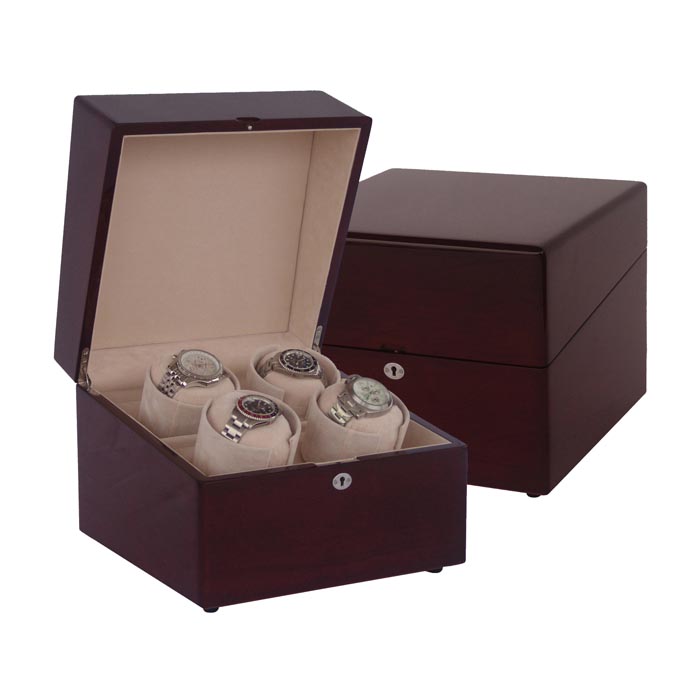
71004 4-Slot Watch Winder User Manual
Four independent motors, smart control system, program update instructions.
71104 4-Slot Watch Winder User Manual
Upgraded version with four independent motors, smart control system.
71204 4-Slot Watch Winder User Manual
Ideal for collections with multiple automatic watches.
71304 4-Slot Watch Winder User Manual
Integrated watch case design, additional storage space.
81104 4-Slot Watch Winder User Manual
With jewelry storage function, multi-functional design.
awa204 4-Slot Watch Winder User Manual
AWA series luxury 4-slot choice.
twa204 4-Slot Watch Winder User Manual
TWA series modern minimalist design, popular product.
twb204 4-Slot Watch Winder User Manual
With 6 watch cases, perfect for watch enthusiasts.
wa034 4-Slot Watch Winder User Manual
WA series entry-level 4-slot product.
wa204 4-Slot Watch Winder User Manual
WA200 series home collection choice.
wb032 4+6 Watch Winder User Manual
4+6 combo, four winding slots plus six storage slots.
wb204 4+6 Watch Winder User Manual
WB200 series optimized design, suitable for small to medium collections.
81106 6-Slot Watch Winder User Manual
With jewelry storage, LED lighting control, storage box instructions.
twa206 6-Slot Watch Winder User Manual
TWA series modern design, professional-grade product.
twb206 6-Slot Watch Winder User Manual
With 8 watch cases, suitable for advanced enthusiasts.
wa035 6-Slot Watch Winder User Manual
WA series entry-level 6-slot choice.
wb033 6+8 Watch Winder User Manual
6+8 combo, six winding slots plus eight storage slots.
wlb106 6-Slot Watch Winder User Manual
WLB business series, for office or study use.
wa036 8-Slot Watch Winder User Manual
Touch control, multiple operation modes, program settings instructions.
wa038 8-Slot Watch Winder User Manual
Improved design, home collection center choice.
wa208 8-Slot Watch Winder User Manual
WA200 series popular multi-slot product.
81109 9-Slot Watch Winder User Manual
With jewelry storage, suitable for large collections.
82109 18-Slot Watch Winder User Manual
Professional-grade product, suitable for serious collectors.
82112 24-Slot Watch Winder User Manual
Large collection cabinet, zoned control, temperature and humidity monitoring instructions.
wla124 24-Slot Watch Winder User Manual
WLA flagship series, luxurious design.
Cleaning & Maintenance Guide
Daily Cleaning
Daily/Weekly- Wipe the exterior with a soft, dry cloth to remove dust.
- For glass panels, spray glass cleaner on a soft cloth and wipe.
- Check watch pillows for dust; clean with a soft brush.
- Keep ventilation openings clear to prevent dust buildup.
Monthly Maintenance
Monthly- Check the power cord for damage and ensure the plug makes good contact.
- Gently press buttons to check their sensitivity.
- Listen for any unusual sounds from the motor during operation.
- Clean internal dust using a vacuum cleaner with a soft brush attachment.
Quarterly Maintenance
Every 3 Months- Check gear lubrication and add special grease if needed.
- Check the elasticity of watch pillows; replace if necessary.
- Check for loose internal screws.
- Apply special wood wax oil to maintain wooden surfaces.
Annual Maintenance
Yearly- Deep clean all internal components.
- Check motor bearings; replace if necessary.
- Check the control board's operational status.
- It is recommended to send the unit to professional service for a comprehensive check.
Troubleshooting Guide
Possible Causes & Solutions:
- Power adapter failure: Check if the adapter's indicator light is on. Try testing with a replacement adapter of the same specifications (Input: 100-240V, Output: DC 3V/1.5A).
- Loose power cord connection: Reconnect the power cord at both ends, ensuring a secure fit. Check the cord for damage.
- No power at outlet: Test the outlet with another device or try a different outlet.
- Blown fuse: Some models have an internal fuse (usually in the plug or inside the unit). Requires replacement by a professional.
- Control board failure: If all the above steps fail, contact support for control board diagnostics (free replacement under warranty).
Possible Causes & Solutions:
- Unstable voltage: Check if your home's voltage is stable. Try a different power outlet.
- Overload protection triggered: Unplug the unit and wait 5 minutes before restarting.
- Control board program error: Try a factory reset (press and hold Mode and Set buttons simultaneously for 5 seconds).
- Motor short circuit: Disconnect the motor to test. If the indicator light returns to normal, the motor needs replacement.
Possible Causes & Solutions:
- Normal operation: Slight warmth (40-50℃ / 104-122℉) during operation is normal.
- Poor ventilation: Ensure the adapter is placed in a well-ventilated area and not covered.
- Overloading: Check if you're powering more than the rated number of slots (max 4 slots per single adapter).
- Adapter failure: If it's extremely hot (over 60℃ / 140℉) and smells burnt, stop using it immediately and replace the adapter.
Possible Causes & Solutions:
- Mode setting issue: Check if it's in intermittent mode (usually 30 min to 2 hours). Wait to see if it resumes after the interval.
- Gear jam: Check for foreign objects jamming the gears. Clean and try turning manually to see if it's smooth.
- Loose motor connection: Open the back cover and check the motor wiring. Reconnect the terminals.
- Motor damage: If the motor smells burnt, runs hot, or has excessive resistance, it needs replacement (Model: OEEA-380 series silent motor).
- Program error: Try a factory reset or re-flash the firmware (see Firmware Update Guide).
Possible Causes & Solutions:
- Low voltage: Check if the adapter output is stable. Replace if it drops below 2.7V.
- Insufficient gear lubrication: Apply special grease to reduce friction.
- Worn bearings: Check and replace bearings if worn (Model: 6800ZZ ball bearings).
- Overloading: Check if the watch pillow is too tight, putting pressure on the watch. Adjust the pillow tension.
Possible Causes & Solutions:
- Control board failure: The bi-directional drive circuit is damaged. The control board needs replacement.
- Internal motor failure: The motor's commutator is worn. The motor needs replacement.
- Loose connection: Check the connection cable between the motor and control board.
Possible Causes & Solutions:
- Worn or broken gears: Check for missing teeth or cracks. Replace damaged gears (OEEA gear set: Module 0.5/0.8).
- Poor gear meshing: Adjust the gear clearance for proper engagement.
- Foreign object: Check for and remove any objects (e.g., screws, wires) caught between gears.
- Damaged bearings: Worn bearings can cause noise. Replace the bearings.
Possible Causes & Solutions:
- Motor resonance: Check if motor mounting screws are loose. Tighten them.
- Unstable voltage: High ripple from the adapter. Replace with a high-quality adapter.
- Motor aging: Internal motor coils may be loose. The motor needs replacement.
- Unstable placement: Place the winder on a level, stable surface. Consider using anti-vibration pads.
Possible Causes & Solutions:
- Unbalanced load: Check if the watch is centered on the pillow. Adjust the pillow position.
- Bent shaft: A deformed shaft causes eccentric rotation. The shaft needs replacement.
- Worn bearings: Excessive bearing clearance. Replace the bearings.
- High speed setting: Reduce the TPD setting (e.g., from 1200 to 800).
Possible Causes & Solutions:
- Dirty panel: Clean the touch panel surface with a slightly damp soft cloth to remove oil and dirt.
- Static interference: Unplug the power for 30 seconds and then reconnect to discharge static.
- Control board freeze: Try a reset (hold power button for 10 seconds or unplug for 1 minute).
- Damaged touch panel: If specific areas are unresponsive, the touch panel may need replacement (Model: OEEA-CTP series).
- Loose ribbon cable: Open the back cover and re-seat the ribbon cable connecting the touch panel to the control board.
Possible Causes & Solutions:
- Voltage fluctuation interference: Unplug for 1 minute and restart to fully reset the control board.
- Program update needed: Check the Firmware Update Guide for the latest version to fix known bugs.
- Factory reset: Press and hold the reset button for 10 seconds (note: this clears all custom settings).
- Control board failure: If garbled characters or freezing persists, the control board needs replacement (free under warranty).
- Display damage: If there are missing segments or screen artifacts, the LCD display may need replacement.
Possible Causes & Solutions:
- Memory battery depleted: Some models have an internal button cell (CR2032) for saving settings. Replace the battery.
- Storage chip failure: The control board's EEPROM is damaged. The control board needs replacement.
- Extended power outage: If power is off for more than 24 hours, some models may reset. This is normal.
Possible Causes & Solutions:
- TPD setting too low: Check the Brand Compatibility Chart for recommended TPD. Increase the setting appropriately (most automatics need 650-800 TPD).
- Incorrect rotation direction: Confirm the winding direction for your watch (most are clockwise, some are bi-directional) and adjust the rotation mode.
- Issue with the watch itself: Manually wind the watch 20 turns and observe if it runs. If it still stops, the watch may need servicing.
- Watch pillow too tight/loose: Adjust the pillow size for a snug but not tight fit. The watch should rotate freely.
- Interval too long: Shorten the interval time between rotations (recommend no more than 2 hours).
- Insufficient power reserve: Ensure the watch was fully wound initially. Some watches with long power reserves need more winding time.
Possible Causes & Solutions:
- Incorrect pillow size: Replace with a correctly sized pillow (S 38mm, M 45mm, L 55mm, XL 60mm).
- Pillow has lost elasticity: Replace the pillow (recommended every 2 years).
- Watch strap too short/long: Adjust the buckle position to ensure the pillow supports the strap properly.
- Metal bracelet slipping: Use special fixings for metal bracelets or increase the pillow width.
Possible Causes & Solutions:
- Pillow material too hard: Replace with memory foam or flocked pillows.
- Foreign matter on pillow: Check the pillow surface for hard particles. Clean regularly.
- Buckle friction: The metal buckle might rub against the pillow. Apply a protective film to the buckle.
- Collision with adjacent watches: Ensure enough space between slots in multi-winder units. Adjust watch positions.
Possible Causes & Solutions:
- Humidity changes: Maintain ambient humidity between 40%-60%. Avoid direct sunlight.
- Dryness causing cracks: Apply special wood wax oil for conditioning and moisture.
- Moisture causing warping: Place desiccants nearby, ensure good ventilation. Severe warping may require factory repair.
- Temperature changes: Avoid placing near heaters or AC vents.
Possible Causes & Solutions:
- Loose glass: Check the glazing bead. Secure it with special adhesive.
- Broken glass: Replace with tempered glass of the same specifications (contact support for dimensions).
- Poor seal: Check the sealing gasket; replace if aged.
Possible Causes & Solutions:
- Damaged LED: Replace the LED strip (Model: OEEA-LED-12V).
- LED driver failure: Check the output voltage of the LED driver.
- Loose connection: Re-seat the LED connection cable.
- Setting issue: Check if the LED light is turned off in the settings menu.
Possible Causes & Solutions:
- Dead battery: Replace the remote battery (CR2025).
- Faulty IR receiver: Check if the IR receiver on the control board is damaged.
- Distance too far: Ensure the remote is within 5 meters and pointed at the IR receiver window.
- Remote not paired: Re-pair (press and hold the remote power button and the unit's pairing button simultaneously for 3 seconds).
Firmware Update Guide
Update Steps
1. Check Current Version
Find the current firmware version in the device settings menu or via the app.
2. Download Firmware File
Find the latest firmware for your model in the list below and download it to your computer.
3. Prepare USB Drive/TF Card
Format your USB drive as FAT32. Copy the firmware file to the root directory.
4. Insert into Update Port
Insert the USB drive into the device's USB port, or the TF card into its slot.
5. Start Update
Select "System Update" in the device menu and confirm to start the process.
6. Wait for Completion
The update takes about 2-5 minutes. The device will restart automatically upon completion.
Available Firmware Downloads
| Model | Version | Release Date | Update Details | Size | Download |
|---|---|---|---|---|---|
| 71001 / 71101 / 71201 | V2.1.0 | 2025-12-10 | Optimized motor control algorithm for quieter operation. | 1.2 MB | Download |
| 71002 / 71102 | V2.0.5 | 2025-11-20 | Fixed dual-motor synchronization issue. Added intermittent mode. | 1.4 MB | Download |
| 71004 | V3.2.0 | 2026-01-15 | Added independent timer function. Optimized UI. | 1.8 MB | Download |
| 81106 / 81109 | V1.8.2 | 2025-10-05 | Fixed LED control issues. Improved stability. | 1.6 MB | Download |
| WA036 | V2.3.1 | 2026-02-01 | Optimized touch sensitivity. Added power-saving mode. | 1.5 MB | Download |
| 82112 / wla124 | V2.1.2 | 2025-12-28 | Added zoned independent control. Fixed temperature/humidity display. | 2.1 MB | Download |
Firmware Update Video Tutorial
Firmware Update FAQs
What if the update fails?
Ensure the firmware file matches your model. Reformat your USB drive and try again. If it still fails, contact support for flashing tools.
Will I lose my settings after updating?
Some versions may reset to factory defaults. It's a good idea to note your current settings before updating.
How do I check my current firmware version?
Go to "About" or "Version Info" in the device settings menu.
Still have questions?
Our technical support engineers are ready to provide one-on-one assistance.
Response within 2 hours on business days · Solution within 24 hours